
The PTS Portal Online Apply is the official online recruitment system of Pakistan Testing Service (PTS). Through the PTS portal, candidates can create an account, complete their profile, apply online for PTS projects, log in using their CNIC, download Roll No Slips, and check test results. Whether you are applying for government pts jobs, admissions, scholarships, or recruitment tests, creating a PTS profile is the first step before submitting an online application. (PTS Registration)
PTS Portal Online Apply For PTS Jobs How to Create Account Profile @www.pts.org.pk
Apply online for the latest PTS Jobs 2026 through the PTS Portal at www.pts.org.pk. Create your candidate profile, complete your personal and educational information, and submit applications for government and private sector vacancies.
PTS Jobs Portal Online Apply Guide
| Title | Details |
|---|---|
| Article | PTS Portal Online Apply |
| Organization | Pakistan Testing Service (PTS) |
| Category | Registration Guide |
| Services | Registration, Login, Online Apply, Roll No Slip, Result |
| Login Method | CNIC & Password |
| Official Website | www.pts.org.pk |
What is the PTS Portal?
The Pakistan Testing Service (PTS) Portal is an online platform that enables candidates to complete the entire recruitment process digitally. After creating an account, applicants can:
- Register online
- Create and update their profile
- Apply for available jobs
- Track submitted applications
- Download Roll No Slips
- View test schedules
- Check PTS Results
- Update personal information when permitted. (Pakistan Testing Service)
| Jobs | Click Here |
| Online Apply | Click Here |
| PTS Portal Login | Click Here |
| Password Issue | Click Here |
| Result | Click Here |
| Roll No Slip | Click Here |
| Answer Keys | Click Here |
| Application Status | Click Here |
How to Create a PTS Profile Online
Follow these steps to create your account:
Step 1
Visit the official PTS website:
Step 2
Open the Registration or Candidate Portal.
Step 3
Click Sign Up.
Step 4
Enter the required information:
- Full Name
- Email Address
- Mobile Number
- CNIC (without dashes)
- Password
- Confirm Password
Step 5
Submit your registration.
Step 6
Log in using your CNIC and password.
Step 7
Complete your candidate profile before applying for any project. (PTS Registration)
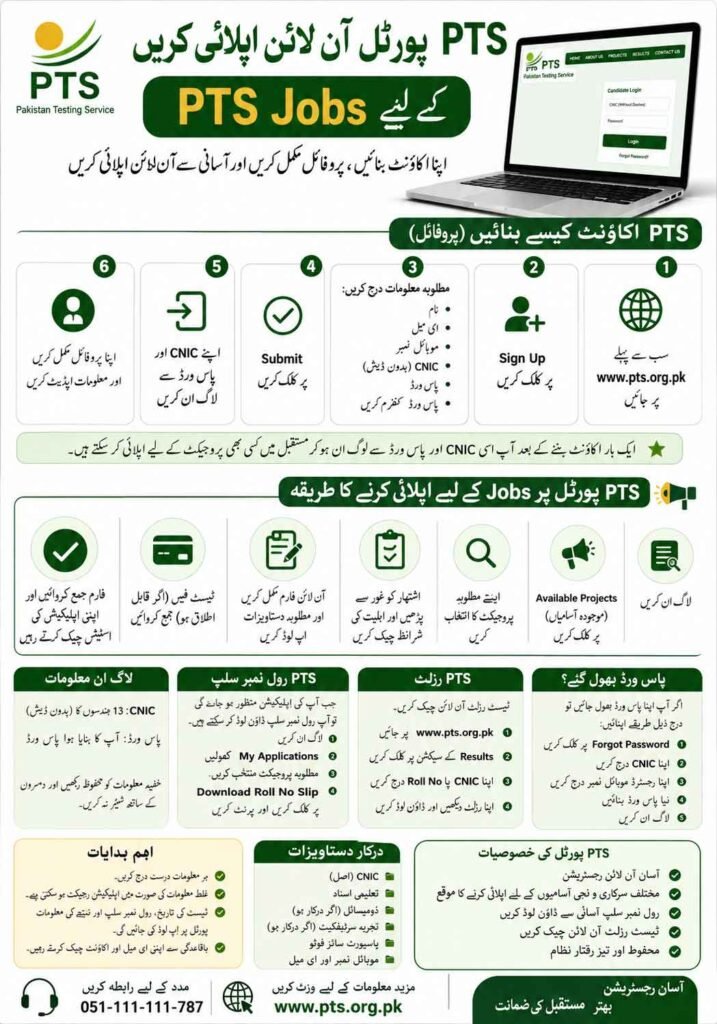
Documents Required For PTS Registration
Before creating your profile, keep the following ready:
- Original CNIC
- Active Mobile Number
- Email Address
- Passport-size Photograph
- Educational Certificates
- Domicile (if required)
- Experience Certificates (if applicable)
PTS Online Apply Process
After completing your profile:
- Login to your PTS account.
- Open the list of available projects.
- Select your desired advertisement.
- Read the eligibility criteria carefully.
- Complete the online application form.
- Upload the required information.
- Submit the application.
- Pay the application fee if required.
- Keep checking your dashboard for updates. (Pakistan Testing Service)
PTS Login With CNIC
Candidates can log into the PTS Portal using their 13-digit CNIC (without dashes) and password.
After login, you can:
- Apply for jobs
- View submitted applications
- Update your profile
- Download Roll No Slip
- Check Results
- Reset your password if forgotten. (PTS Registration)
PTS Registration
PTS registration is a one-time process. Once your account has been created, you can use the same CNIC and password to apply for future PTS recruitment projects. If your CNIC is already registered, use your existing login credentials instead of creating another account. (PTS Registration)
PTS Portal Login Result
PTS publishes written test results for many recruitment projects through its official portal. To check your result:
- Visit the PTS website.
- Open the Results section.
- Enter your CNIC or Roll Number.
- View and download your result if available. (Pakistan Testing Service)
PTS Portal Login Roll No Slip
Once your application has been accepted, you can download your Roll No Slip online.
Steps:
- Visit the PTS Portal.
- Login using your CNIC.
- Open your application.
- Click Download Roll No Slip.
- Print the slip for the written test or interview. (PTS Registration)
Forgot Your PTS Password?
If you forget your password:
- Open the Candidate Login page.
- Click Forgot Password.
- Enter your CNIC.
- Enter your registered mobile number.
- Create a new password.
- Login again using your updated credentials.
Benefits of the PTS Portal
- One-time registration
- Online job applications
- Secure candidate account
- Easy profile management
- Roll No Slip download
- Online result checking
- Application tracking
- Fast recruitment updates
Common Login Problems
If you cannot access your account:
- Make sure your CNIC contains exactly 13 digits without dashes.
- Use the same mobile number used during registration.
- Ensure your password is correct.
- Use the Forgot Password option if necessary.
- Clear your browser cache or try another browser if the portal is not responding.
Frequently Asked Questions
How do I create a PTS profile?
Visit www.pts.org.pk, click Sign Up, enter your personal information, and complete your registration.
Can I log in with my CNIC?
Yes. The PTS Candidate Portal allows registered users to log in using their 13-digit CNIC (without dashes) and password.
How do I download my PTS Roll No Slip?
Log in to your account or open the Roll No Slip section, enter your CNIC, and download the slip once it has been issued.
How can I check my PTS Result?
Visit the Results section on the PTS website and enter your CNIC or Roll Number to view your result.
What is the official website of Pakistan Testing Service?
The official website is www.pts.org.pk.